Pokémon Go is now officially out in more than 30 countries. Here's how to get started on your real-world Pokémon journey.
The mobile game, which lets you catch Pokémon in augmented reality as you explore the world around you, has begun rolling out to Google Play and the App Store in certain countries.
In preparation for your own Pokémon journey, WIRED has tips on what to expect from the game and how to play.
First Steps
Despite shifting to phones from handheld games consoles,Pokémon Go feels very familiar if you've ever played a core series game before. You'll meet the newest Pokémon Professor, Professor Willow, who'll guide you on your way and explain the world of Pokémon.
First though, you'll name and customise your character. You can choose male or female avatars, and choose their skin tone and some other basic aesthetic features. You'll also pick out an outfit – there are essentially three complete costumes, but the parts can be mixed and matched to create a more individual look. You'll level up as a Pokémon Trainer as you progress, which makes more Pokémon available for capture and allows you to take on gym battles.
Be warned: once you've customised your avatar, you cannot change your selections so choose wisely.

The actual gameplay tutorial is fairly brief. Willow gives you a Pokéball and sends you off to catch your first Pokémon – one of the original starter trio from the original Pokémon Red and Blue, Bulbasaur, Charmander, or Squirtle – and introduces you to the basic mechanics. This is also your first chance to check out theaugmented reality feature of the game, which places your target Pokémon into your surroundings, using your phone's camera. Flick a Pokéball in their direction and they're yours, but future captures won't be so easy.
How to get Pikachu as a starter
The team at Polygon has discovered a way to bypass the original trio and select Pikachu as a starter in Pokémon Go instead.
Instead of selecting Bulbasaur, Charmander, or Squirtle, walk away from the trio to make them disappear. If you are able to repeat this four times, they return with Pikachu. However, as Polygon explained, this can be difficult. Polygon's full instructions can be found here.
YouTube channel Game Informer has also released a video tutorialon how to achieve this.
Catch 'em All
The method of catching Pokémon is probably the biggest difference between Pokémon Go and the core games. While you'll still encounter them in the wild, you won't actually battle them or whittle their health down. Instead, successful capture is determined by the Pokémon's level, the type of Pokéball used, and even your throwing technique. If you're playing with AR switched on, you'll also want to centre the critter in the screen as best you can, and keep your phone steady for improved results. AR isn't mandatory though – if you play without, you'll simply have an entirely digital encounter.
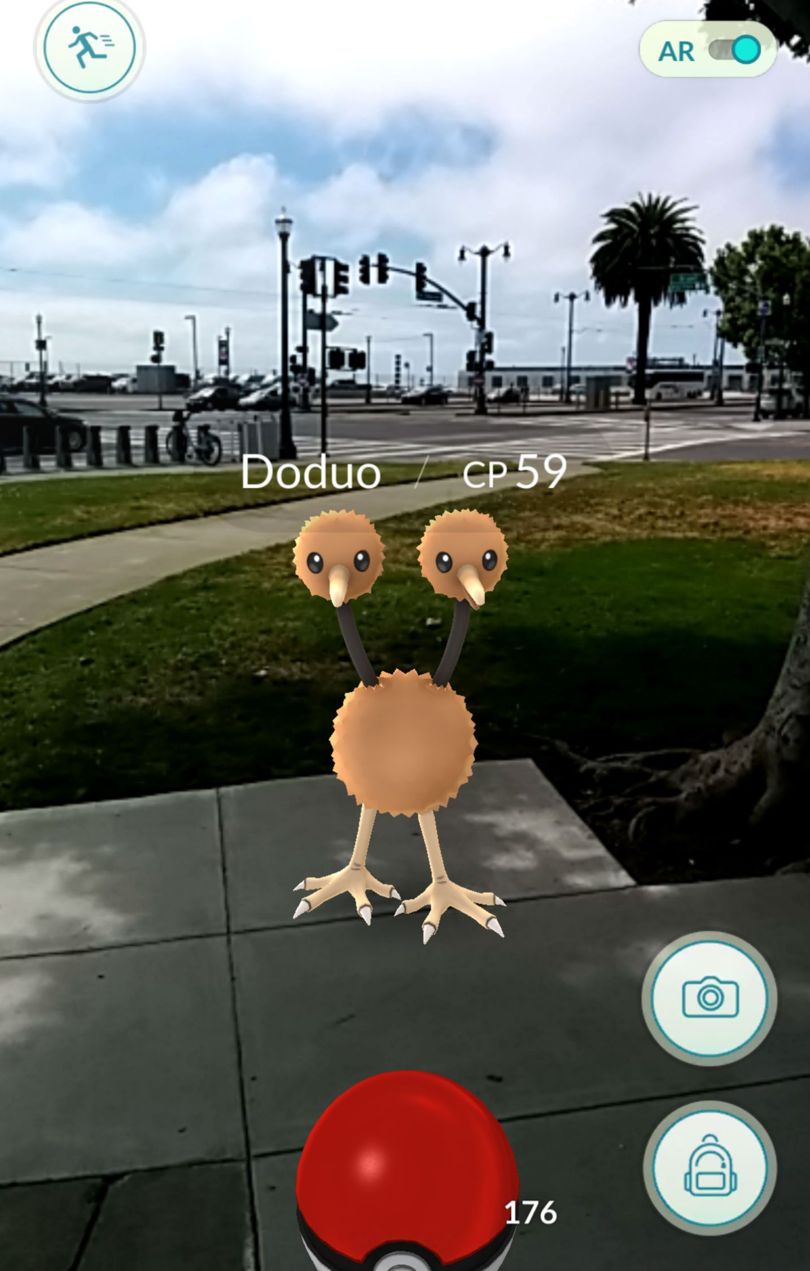
The Pokémon you encounter will depend on where you are in the real world. Walk along a canal or river, and you'll encounter more water-types; a park might yield more grass-types. Quite where you'll meet some of the more exotic types, such as psychic, we haven't quite figured out yet.
Evolving your Pokémon
Fans of the show will know that certain characters can be evolved either once or twice. Charmander, for example, can evolve into Charmeleon and then into Charizard and with each evolution, their moves and special moves evolve too.
To evolve your characters in Pokémon Go, you'll need to collect Candies and Stardust. Every capture you make increases your Stardust, but you need to catch the same character multiple times to get character-specific Candies. For example, each time you catch Charmander you'll get three Charmander candies and you need 50 to evolve into Charmeleon.
You can't use candies from one character to evolve another. You can also get more Candies by transferring individual Pokémon back to Professor Willow, but this only produces one candy per transfer.
Below each Pokémon on their respective information page is a Stardust gauge, the number of Candies you have as well as their special moves. In addition to using Stardust to evolve your Pokémon, it can also be used to boost a character's combat points (CP).
Keep in mind that rarer Pokémon – particularly starters – will be much harder to evolve purely on the basis of scarcity.
Selecting Pokémon to transfer
Ultimately, a Pokémon's CP gives it its strength, but you also need to consider its health points (HP) and the points next to their special moves. CP can be boosted using Stardust, but the move points are harder to change to it's better to have more accurate or powerful moves and then a higher CP than transfer Pokémon based purely on lower CP. When you power up a Pokémon, this also increases the character's HP.
How to use a Pokéstop
Pokémon Go uses landmarks in your vicinity to create Pokéstops and Pokémon Gyms, and everything from national monuments to local curiosities can be a discovery in the game.
Walk along the street, and a nearby plaque or historical object can serve as a Pokéstop. These appear as cubes until you are close enough to use them. Once close enough, the cube becomes a circle and selecting it shows you landmark that is plotted by this Pokéstop
This image becomes a spinning marker. Spin the marker until its blue colour becomes a light purple and it releases Pokéballs. As you move through the levels, you can also collect Potions, Revive tokens, Lure modules, Razz Berries and Great Balls among other gifts.

How to use and battle at Gyms
Gyms are different to Pokéstops. Although they're placed in the real world like Pokéstops, they can't be challenged until you reach Pokémon Trainer level five. At this point you will also be asked to pick a team – Team Mystic, Team Valor and Team Instinct – which are blue, red and yellow respectively.
Gyms offer the only form of Pokémon battles in the game, pitting you against a rival's team. There aren't any moves to select either – victory is determined by your Pokémon's Combat Power (CP), while fights themselves involve tapping to attack and swiping to dodge.
That said, certain attacks are better against certain Pokémon.
The majority of Gyms will have already been claimed by a team and you can determine which team currently occupies that Gym because they are colour-coded, either red, blue or yellow. If the Gym is white, it means it isn't currently occupied or is between owners.
Tapping on a gym will reveal which team currently controls it, what level it is and how many Pokémon are guarding it. The name of the gym is shown along the top.

Below the picture of the gym is a number and this relates to its strength, or 'prestige'. The higher the right-hand number, the more powerful it is and the harder it is to beat. You will then see the Pokèmon that are defending the gym, including their name and their CP as well as the trainer's name in the top right-hand corner. Swiping the screen will reveal how many Pokémon currently occupy that gym and gyms can hold up to 10 at a time. You have to defeat all Pokémon in a gym to take it over.
You don't have to battle against rival teams, however. You can battle at friendly Gyms with people on the same team colour. This will help boost the prestige of your team's Gym. Battling at rival Gyms lowers its prestige until its weak enough to be taken over. The higher the level of prestige a gym has, the more Pokémon it can hold and you can check the prestige level by selecting a gym and Once your team owns a Gym, you have the option to leave a Pokemon behind at your team's gym to aid in its defence. This will remove it from your Pokédex and place it in the line-up at the Gym until it is defeated. The longer you are in the Gym, the better your endurance and you will be rewarded with PokéCoins to increase your strength and Defender bonuses.
Using incense and Lures
Players can either buy incense or collect them from Pokéstops. The same applies for Lures. Incense can be placed around you to attract Pokémon to your vicinity and lasts 30 minutes. This will move as you move and only you can see it.
Lures can be placed around nearby Pokéstops and they appear as glittering purple and blue markers which any player can see. To add a Lure, select a nearby Pokéstop, go to your Items list – by selecting the Pokéball on the app's map page – and select the Lure module. Modules can be found in Pokéstops, bought, or awarded to you when you level up.
Revive, Potions and Razz Berries
As you level up, catching Pokémon will be trickier. It may take a couple of attempts, especially if the Pokémon's Combat Points (CP) are particularly high. You can increase your chances by feeding them Razz Berries.
After a battle in the gym, your Pokémons' Health Points (HP) will drop. Click on damaged Pokémons and use either a Revive token or a Potion to boost their health.
Revive is a medicine that can revive fainted Pokémon. It also restores half of a fainted Pokémon's maximum HP.
A Potion is a spray-type medicine for treating wounds. It restores the HP of one Pokémon by 20 points.
Eggs and catching rare Pokémon
Certain Pokéstops release eggs. These eggs contain a number of rare Pokémons but they need to be incubated. Every player gets an incubator that can be used infinite times. You can also collect or buy additional incubators.
When you collect an egg, they sit in a separate tab in the Pokémon menu. Under each egg is a distance – 2km, 5km or 10km. This is how long you need to walk for these eggs to hatch. However, the walking 'timer' only begins when the egg is in an incubator and kilometres only count if the app is open as you walk.
This can be a big drain on battery. To combat this problem, Niantic has included a battery saving mode in the settings menu – select it and the screen will black out when the phone is being held by a player's side or in their pockets.
If you put your phone onto Vibrate or Loud mode, you can also hold the phone by your side (with the app open) and be notified when a Pokémon appears in your vicinity. This will spare you from constantly looking at your phone and put you less at risk of muggers, for example.
There are also companies who will do the legwork, literally, for you. Fantastic Services, for example, is currently offering a service in which someone will walk the 10km needed to hatch certain eggs for you. They will also collect eggs, Pokéballs and other goodies from Pokéstops along the way for a fee. This does mean handing your phone over to a stranger, though, which may not be preferable.
Count the PokéPennies
Pokémon Go is free-to-play, but it does include microtransactions. Virtual Pokécoins are sold at the following rates:
100 - £0.79
550 - £3.99
1200 - £7.99
2500 - £14.99
5200 - £29.99
14,500 - £79.99
550 - £3.99
1200 - £7.99
2500 - £14.99
5200 - £29.99
14,500 - £79.99
Coins are then spent on items, including extra Pokéballs that you'll need to actually catch Pokémon you encounter, support items such as incense to attract rarer creatures, eggs that hatch into new Pokémon, and upgrades for both your item backpack and Pokémon storage. Although you get proportionally more coins the more real-world money you spend, just shy of £80 is a lot to ask for the highest tier package.
To buy items, select the Pokéball icon on the app's map page and go to Shop. Scroll down to buy Pokécoins to add them to your account. The total number of coins is shown in the top right-hand corner. You can then use these coins to buy items.
If you are shown an error message about your account being 'too full' it means you have too many balls, potions, revives, eggs and so in your virtual bag. You can either remove these items to free up space, or pay to expand the capacity of your bag.
To remove items, go to the Pokéball, Items and hit the trash can icon next to each item. From here you can select how many of each item you want to remove from your bag.

The game isn't a complete cash-grab, though. Like most free-to-play titles, Pokémon Go can provide everything you need without parting with cash - it just requires a bit of patience. Every Pokéstop you reach provides free items when you activate it, and although the selection is entirely random, it's the easiest and cheapest way to restock your supplies.
Power Through
Or: remember to bring a back up battery. Between GPS location tracking, an active screen, and generating augmented reality creatures to capture, Pokémon Go is a power-hog. While the beta was absolutely monstrous in this regard – we went through a full charge in roughly three hours – the final version is only somewhat improved, with gamers in New Zealand and the US still reporting significant battery drainage after only short periods of play. Niantic is aware of the issue, saying "we are working on a solution".
In the meantime, the only real option for a lengthy play session is to carry a power bank for your device. Depending on the form factor, it could prove fiddly to hold both, but it's currently the best way to avoid your phone dying while you try to catch a Rattata. Failing that, the nation's coffee shops can soon expect Pokémon battles of a different sort as players start dropping in to recharge over a latte. Just don't forget your charger.

Wear Sunscreen
Not just good life advice - Pokémon Go is is intrinsically an outdoor, active game, and that means you'll be exposed to the elements while you hunt down the Pokémon in the world around you.
Obviously, many players will be playing Pokémon Go in small bursts inbetween their daily routines, but for anyone planning to dedicate a chunk of time to playing, they should factor in some basic preparations that don't quite apply when you're battling the Elite Four in Pokémon games on your 3DS. You'll be walking a lot, and while that's good for health reasons - you'll rapidly hit 10 to 12k steps on the hunt - you'll want comfortable shoes to do so. You'll also want actual sunscreen on hot days (we got slightly burnt ourselves) and appropriate weather protection otherwise.

Also, be considerate of people around you, and pay attention to where you are. While the game is already a hit, not everyone will appreciate you stopping suddenly in the street to visit a Pokéstop or take on a Gym Battle. Like Ingress, Niantic's other GPS-enabled explorathon game, part of Pokémon Go's charm is in discovering the hidden cultural artifacts around you. To really enjoy the game, stop for a minute and appreciate where it's taken you, before ploughing ahead on filling your Pokédex.